Container Technology Wiki
Docker Containers
- Docker 101
- Basic Docker Operations
- Docker Administration
- Docker Security Resources
- Docker OS Interaction
- Docker With Other Tools
- Docker API
- Docker Compose
Kubernetes Guide
- Kubernetes 101
-
Kubernetes Architecture
- Kubernetes Ecosystem
- Kubernetes Nodes
- Kubernetes Pods
- Kubernetes Controllers and Control Plane
- Kubernetes DaemonSets
- Container Runtime Interface
- Working with Containers in Kubernetes
- Working with Images in Kubernetes
- Workloads in Kubernetes
- Kubernetes Services
- Kubernetes Jobs
- Kubernetes and Microservices
- Kubernetes Operators
- Kubernetes Persistent Volumes
- Kubernetes Advantages and Use Cases
-
Kubernetes Operations
- Installing Kubernetes
- Kubernetes Configuration
- Kubernetes Monitoring
- Kubernetes Debugging and Troubleshooting
- Kubernetes Load Balancing
- Kubernetes Security
- Kubernetes Networking
- Kubernetes Storage Management
- Kubernetes in Production
- Working with Kubernetes Ingress
- Kubernetes Security Best Practices
- Managing Kubernetes with Kops and Kubeadm
- Kubernetes Secrets
- Kubernetes Autoscaling
- Kubernetes ConfigMap
- Kubernetes Namespace
- Kubernetes Authentication
- Kubernetes Vault
- CIS Kubernetes Benchmark
- Kubernetes Cluster
- Kubernetes as a Service
- Managed Kubernetes
- Kubernetes Distributions
- Enterprise Kubernetes
Container Basics
- Container Architecture
- Advantages of Containers
- Container Challenges
- Containers and IT Infrastructure
- Enterprise DevOps
- eBPF
- eBPF Linux
Containers Ops
- Container Security Management
- Container Deployment
- Container Monitoring
- Container Automation
- Container Multitenancy
- Container Backup and Disaster Recovery
- Prometheus Monitoring
Container Security
- Container Security Best Practices
- Containers for DevSecOps
- Container Vulnerabilities and Threats
- Container Vulnerability Scanning
- Container Secrets Management
- Container Access Control
- Container Audits and Compliance
- Application Whitelisting
- Zero Trust Networks
- Network Segmentation for Containers
- Container Isolation
- Open Source Security Tools for Containers
- Open Source Vulnerability Scanner
- Open Source Security Tools
- Container Security Tools
Cloud Native Computing Foundation
- AWS EC2 Security
- Cloud-Native Applications
- Cloud-Native Architecture
- Cloud Native AWS
- Cloud Native Development
- Cloud Native Infrastructure
- Cloud Native Security
- Envoy Proxy
- Harbor Kubernetes
- Open Policy Agent
- Oracle Cloud Security
- SaaS Cloud Security
- Security Issues in Cloud Computing
- SPIFFE
- VMware Tanzu
Serverless Computing
- Serverless Architecture
- AWS Lambda
- Azure Functions
- Google Cloud Functions
- Serverless Security
- On-Premises Serverless Platforms
- Function as a Service - FaaS
- Knative
- Serverless vs Containers
Container Platforms
- Containers and Cloud Computing
- Container Operating Systems
- Red Hat Openshift
- Pivotal Container Service
- Multi-Cloud Strategy
- Kubernetes vs Cloud Foundry
- CWPP
Other Container Engines
Kubernetes Alternatives
Container Community and Events
- Container Technology Wiki
- Docker Containers
- Docker 101
- Docker Containers vs. Virtual Machines
Docker Containers vs. Virtual Machines
Docker provides many capabilities of Virtual Machines, with added advantages. Learn how they compare.
In this page: everything you need to know about the differences between Docker containers and Virtual Machines
When it comes to cloud infrastructure, VMware has long been the go-to standard for its many advantages: its ability to run multiple OS environments that don’t affect each other, the choice of virtual machine types, and its consolidated toolkit that makes VM management easy. However, consider this: What if you had an alternative to VMware that was more lightweight, economical and more scalable? That’s exactly what Docker is - a container technology that lets users develop distributed applications.
So, how are the two different? And how do they complement each other? Let’s find out.
What is a Virtual Machine
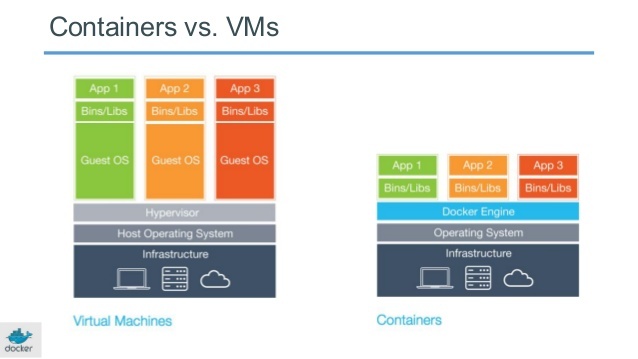
The concept of a virtual machine is simple, really: it’s a virtual server that emulates a hardware server. A virtual machine relies on the system’s physical hardware to emulate the exact same environment on which you install your applications. Depending on your use case, you can use a system virtual machine (that runs an entire OS as a process, allowing you to substitute a real machine for a virtual machine), or process virtual machines that let you execute computer applications alone in the virtual environment.
Source: Docker
For more details on VMs, and for some background for evaluating Docker vs VM, see the official site: VMware
What is Docker?
Docker is an open source project that offers a software development solution known as containers. To understand Docker, you need to know what containers are. According to Docker, a container is ” a lightweight, stand-alone, executable package of a piece of software that includes everything needed to run it.” And since containers are platform-independent, Docker can run across both Windows- and Linux-based platforms. In fact, Docker can also be run within a virtual machine if need be. The main purpose of Docker is that it lets you run microservice applications in a distributed architecture.
Docker Architecture
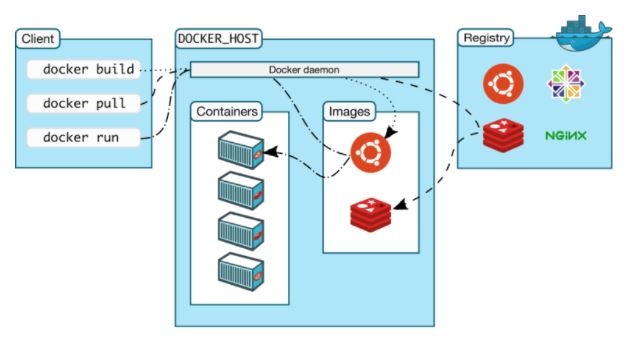
Docker’s architecture is also client-server based. However, it’s a little more complicated than a virtual machine because of the features involved. It consists of four main parts:
Source: Docker
Docker Client: This is how you interact with your containers. Call it the user interface for Docker.
Docker Objects: These are your main components of Docker: your containers and images. We mentioned already that containers are the placeholders for your software, and can be read and written to. Container images are read-only, and used to create new containers.
Docker Daemon: A background process responsible for receiving commands and passing them to the containers via command line.
Docker Registry: Commonly known as Docker Hub, this is where your container images are stored and retrieved.
For more details, see the official site: Docker product discovery
Common Use Cases
Now that you have an idea of what VM and Docker containers are, it’s important to understand the potential use cases for both. While they are both more or less used to develop applications, here is where the differences really start.
Real-World Use Case for VMs
Starling Bank is a digital-only bank that was built in just one year on VMs provided by AWS. This is possible because of the efficiency virtual machines deliver over traditional hardware servers. Importantly, it cost Starling Bank just a tenth of traditional servers.
Real-World Use Case for Docker
Paypal uses Docker to drive “cost efficiency and enterprise-grade security” for its infrastructure. Paypal runs VMs and containers side-by-side and says that containers reduce the number of VMs it needs to run.
Application development: Docker is primarily used to package an application’s code and its dependencies. The same container can be shared from Dev to QA and later to IT, thus bringing portability to the development pipeline.
Running microservices applications: Docker lets you run each microservice that makes up an application in its own container. In this way, it enables a distributed architecture.
Docker Containers vs. VMs
At last, we arrive at the big question: how are the two different? It all comes down to what you want to do with them. Below, we’ll mention a few advantages of Docker as opposed to a virtual machine (specifically Docker vs. VMware), and vice versa.
| Pricing comparison |
|---|
| **Docker**: Free. Enterprise Edition starts at $750/node/year. |
| **VMware vSphere**: Standard license starts at $995. |
For more details and a Docker vs VM comparison, see this page by UpGuard.
Advantages of Virtual Machines
The tools associated with a virtual machine are easier to access and simpler to work with. Docker has a more complicated tooling ecosystem, that consists of both Docker-managed and third-party tools.
As mentioned earlier, once you have a virtual machine up and running, you can start a Docker instance within that VM, and run docker container within the VM (which is the predominant method of running containers at present). This way, containers and virtual machines are not mutually exclusive and can co-exist alongside each other.
Advantages of Docker Containers
Docker containers are process-isolated and don’t require a hardware hypervisor. This means Docker containers are much smaller and require far fewer resources than a VM.
Docker is fast. Very fast. While a VM can take an at least a few minutes to boot and be dev-ready, it takes anywhere from a few milliseconds to (at most) a few seconds to start a Docker container from a container image.
Containers can be shared across multiple team members, bringing much-needed portability across the development pipeline. This reduces ‘works on my machine’ errors that plague DevOps teams.
For more details, see an in-depth discussion: How containers and VM are different
The road ahead is quickly changing for VMs at least, as Docker is quickly rising in popularity among major corporations. It’s clear that speed and efficiency are the biggest needs for DevOps teams, and Docker is better at providing these over VMs. While it still hasn’t completely replaced virtual machines in production environments, Docker’s potential is being noticed. That isn’t to say that VMs will soon be gone. Rather, Docker and VMs will co-exist next to each other, giving DevOps teams more choices in how to run their cloud-native applications.
Further Reading
- Docker 101
- Docker Containers vs. Virtual Machines
- 100 Best Docker Tutorials
- Docker Architecture
- Docker Registries 101
- Docker Images 101
- Docker Security - Risks, Benefits and 8 Best Practices
- Docker Tools
- Docker Alternatives - Rkt, LXD, OpenVZ, Linux VServer, Windows Containers
- Docker Swarm 101
- Docker vs. Kubernetes - 8 Industry Opinions
- Docker Networking 101
- Docker in the Cloud
- Docker in Production
- Docker Deployment
- Basic Docker Operations
- Docker Administration
- Docker Security Resources
- Docker OS Interaction
- Docker With Other Tools
- Docker API
- Docker Compose
Get updates on container technology

